Auto-translated ·
LaptopTester v3.3 – a journey from outrage over scams to a practical technology solution for the community:
1: The "Matrix" of fake configurations and the worries of buying used machines
The story begins from the painful reality in the used laptop market. Dishonest sellers are using extremely simple yet effective tricks to "transform" weak machines into powerful ones:
In just 2 minutes, manipulating Registry ProcessorNameString, an outdated i5 CPU can proudly display as an i7 on Dxdiag or My Computer.
WMI Spoofer makes the entire system from Task Manager to System Properties "read" fake specifications, fooling even those who have some technical knowledge.
Amidst a forest of "fake" configuration tutorial videos flooding YouTube, ordinary buyers become disadvantaged. The advice "bring someone experienced with you" becomes a barrier, as not everyone has a tech-savvy friend by their side.
2: The suffering of "7 steps, 5 software"
Even for those who are cautious and want to check on their own, they fall into another maze. To thoroughly test a machine, you must:
Download CPU-Z to check components.
Download CrystalDiskInfo to inspect the hard drive.
Download BatteryMon to measure battery wear.
Access websites to test dead pixels, test keys, test camera...
Having to prepare 5-7 different tools, without knowing which ones are accurate or safe, is a torment. It is from this cumbersome and complex situation that the idea of an "All-in-one" tool was born.
Chapter 3: LaptopTester – When "SMBIOS" speaks out
The author decided to build LaptopTester with the ultimate goal: Transparency.
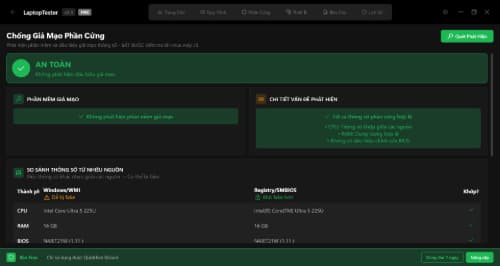
The core point that makes this application different is the mechanism of cross-comparison from 3 independent sources: WMI, Registry, and SMBIOS. While the Registry can be easily tampered with, SMBIOS (hardware firmware) is a fortress that is very difficult to intervene in. If there is a discrepancy between these sources, LaptopTester will immediately "expose" the scammer.
Not stopping there, the Quick Test 10 steps feature is designed like a virtual expert, guiding users from checking the speakers, microphone to scoring overall /100. The message is very clear: "You don't need to be an expert; you just need to follow the instructions."
4: The philosophy of "Convenience and Fairness"
LaptopTester v3.3 is perfected with the philosophy:
Portable: A single
.exefile, runs directly from USB, does not require installation (to avoid leaving traces on the seller's machine) and does not require Internet.Accessible: The interface is entirely in Vietnamese for Vietnamese users.
Fair: The basic version is free for everyone. The Pro version costs 149K (just the price of a meal) for those who need more in-depth features like AI consultation or professional report generation.
LaptopTester is not just software; it is a technological "shield" that makes the used laptop market more transparent, where buyers no longer have to fear sophisticated deception tricks.
More from LE AN


Related products

Spark Linux
1 hệ điều hành được phát triển ở Việt Nam, chuyên về hiệu năng và UI
91

Storm.
Ứng dụng thời tiết và cảnh báo
70
DBA Noise Meter
Đo Độ Ồn
60

MeoBoost
⚡ Optimize Windows 10/11 for maximum gaming performance
60

CutStick
Tách sticker hàng loạt chỉ trong 1 click
53
DiskCleanKit
Clean Your Mac in Seconds - Free Junk & Duplicate Remover
50
LaptopTester
Kiểm tra laptop chuyên nghiệp
27
Reviews & comments